Chameleon Partials
Simple reuse of partial HTML page templates in the Chameleon template language for Python web frameworks. (There is also a Jinja2/Flask version here.)
Overview
When building real-world web apps with Chameleon, it’s easy to end up with repeated HTML fragments. Just like organizing code for reuse, it would be ideal to reuse smaller sections of HTML template code. That’s what this library is all about.
Documentation
Full documentation lives at mkennedy.codes/docs/chameleon-partials, including the complete API reference generated from the library’s docstrings.
Example
This project comes with a sample Pyramid application (see the example folder). This app displays videos that can be played on YouTube. The image, author subtitle, and view count are reused throughout the app. Here’s a visual:
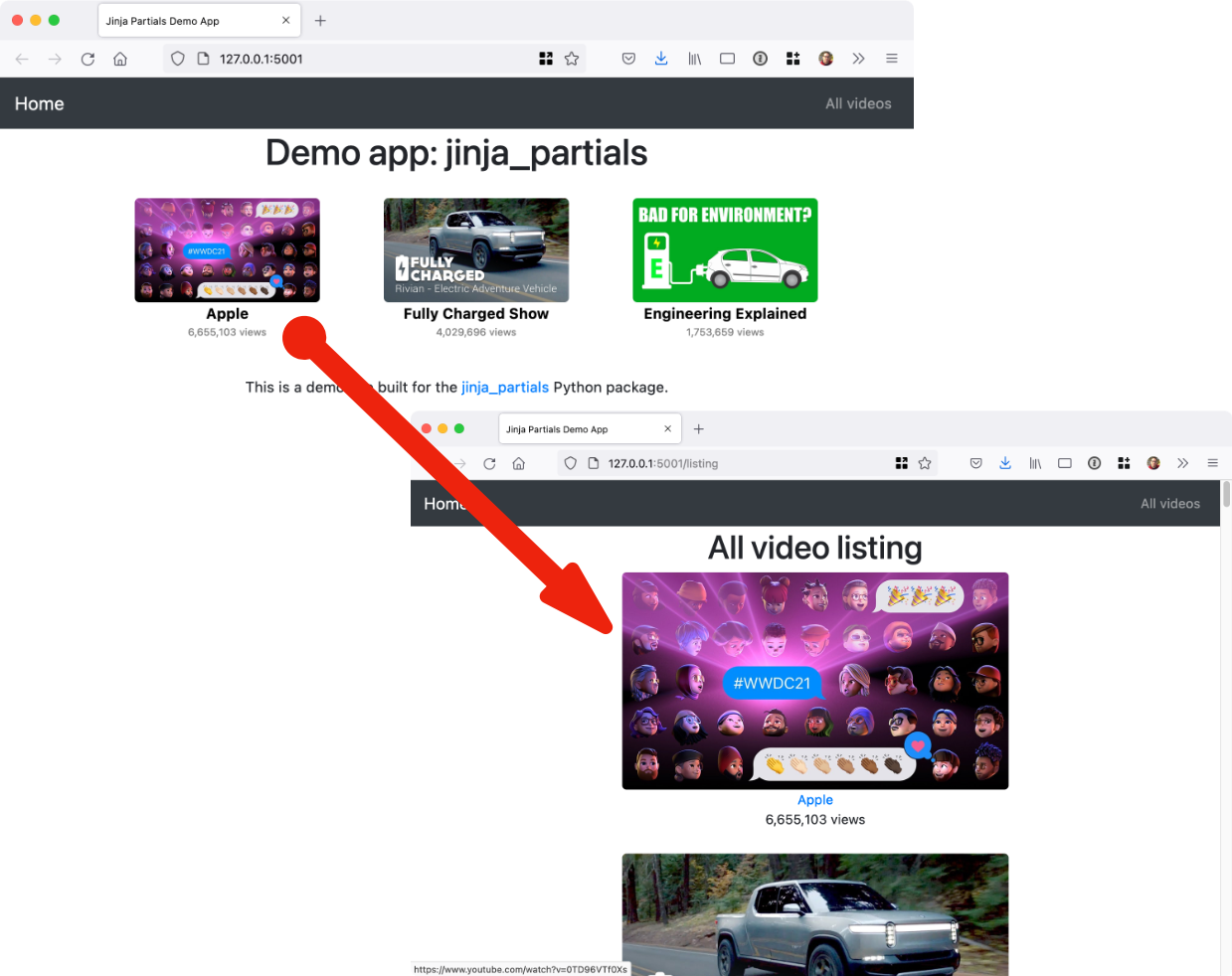
Check out the demo / example application to see it in action.
Installation
It’s just pip install chameleon-partials and you’re all set with this pure Python package.
Usage
Using the library is incredibly easy. The first step is to register the partial method with Chameleon. Do this once at app startup:
from pathlib import Path

from pyramid.config import Configurator

import chameleon_partials

def main(_, **settings):
    """ This function returns a Pyramid WSGI application.
    """
    with Configurator(settings=settings) as config:
        config.include('pyramid_chameleon')
        config.include('.routes')
        config.scan()

        # Register the extension for working with Chameleon.
        folder = (Path(__file__).parent / "templates").as_posix()
        chameleon_partials.register_extensions(folder, auto_reload=True, cache_init=True)

    return config.make_wsgi_app()
Next, you define your main HTML (Chameleon) templates as usual. Then define your partial templates. I recommend locating and naming them accordingly:
├── templates
│   ├── errors
│   │   └── 404.pt
│   ├── home
│   │   ├── index.pt
│   │   └── listing.pt
│   └── shared
│       ├── _layout.pt
│       └── partials
│           ├── video_image.pt
│           └── video_square.pt
Notice the partials subfolder in the templates/shared folder.
The templates are just HTML fragments. Here is a stand-alone one for the YouTube thumbnail from the example app:
<img src="https://img.youtube.com/vi/${ video.id }/maxresdefault.jpg"
     class="img img-responsive ${ ' '.join(classes or []) }"
     alt="${ video.title }"
     title="${ video.title }">
Notice that an object called video and a list of classes are passed in as the model.
Templates can also be nested. Here is the whole single video fragment with the image as well as other info linking out to YouTube:
<div>
    <a href="https://www.youtube.com/watch?v=${ video.id }" target="_blank">
        ${ render_partial('shared/partials/video_image.pt', video=video, classes=[]) }
    </a>
    <a href="https://www.youtube.com/watch?v=${ video.id }" target="_blank"
       class="author">${ video.author }</a>
    <div class="views">${ "{:,}".format(video.views) } views</div>
</div>
Now you see the render_partial() method. It takes the subpath into the templates folder and any model data passed in as keyword arguments.
We can finally generate the list of video blocks as follows:
<span class="video" tal:repeat="v videos">
    ${ render_partial('shared/partials/video_square.pt', video=v) }
</span>
This time, we reframe each item in the list from the outer template (called v) as the video model in the inner HTML section.
The View Methods
In order to share the render_partial() function with your template, you’ll need to pass it along to the template with your model (dictionary).
If you are using the Pyramid web framework, you can add this file as middleware. Just drop it into your views folder:
# views/partials_middleware.py
from pyramid.events import subscriber, BeforeRender

import chameleon_partials


@subscriber(BeforeRender)
def add_global(event):
    event['render_partial'] = chameleon_partials.render_partial
For other frameworks using Chameleon (e.g. FastAPI), you can add render_partial to the resulting dictionary. We’ve built a simple function to keep this fool-proof:
chameleon_partials.extend_model(model)Here’s a typical view method that uses render_partial, notice the use of extending the model before passing it to the template (the example app’s views skip this because the middleware above handles it):
@view_config(route_name='listing', renderer='demo_chameleon_partials:templates/home/listing.pt')
def listing(_):
    videos = video_service.all_videos()
    model = dict(videos=videos)
    return chameleon_partials.extend_model(model)
Again: If you are using Pyramid, use the middleware. Otherwise, use the extend_model() method or something similar to the middleware in your framework.