
[Update: Renamed this tool from Gmailer to Gmail 7 due to pre-existing product name conflicts]
I’ve been using Windows 7 as my sole operating system since Beta 1 in January. I’m completely loving it and I was pleased to see how many apps worked seamlessly on it. One that didn’t and I really miss is Gmail Notifier [defunct link: http://toolbar.google.com/gmail-helper/notifier_windows.html]. No matter how I try, I always get this:
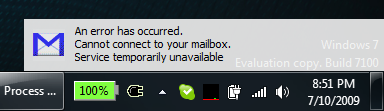
It’s insane to me that $130B company can’t provide any more than this outdated tool for this job, but I digress…
I’ve looked and looked for a replacement and they are either no longer online, are crappy applications, and so on. Finally I decided to take matters into my own hands. Introducing a clean, simple, unobtrusive, and free Gmail notification application that works on Windows 7 – Gmail 7 :
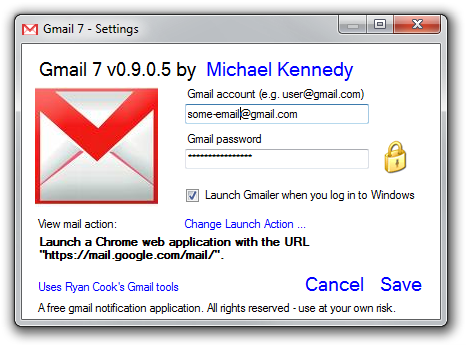
Gmail 7 simply runs in your tray and plays the Windows new mail sound when mail comes in to your Gmail account.
New Mail:

No New Mail:

That’s pretty unobtrusive right? Your account info is encrypted and stored in your user profile and all network access uses SSL.
Download all 41 KB of Gmail 7 here: Gmail7.zip [defunct link: http://michael-kennedy.s3.amazonaws.com/blog/more-downloads/Gmail7.zip]
Requires .NET 2.0 (built into Vista and Windows 7)
Just extract the folder to its final resting place and run it – select “Launch at login” if you want that.
It even comes with some cool ways to view your email by double-clicking the tray icon.
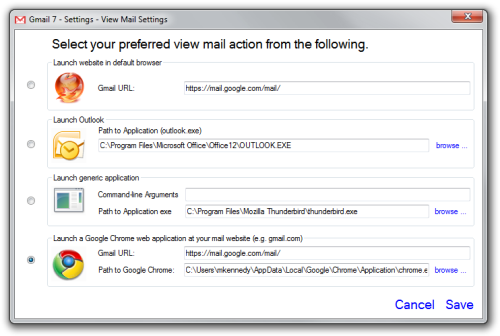 ](gmailerlaunchoptinos.png)
Also thanks goes to Ryan Cook for use of his Gmail C# tools as the basis for part of my project.