
ClickOnce is a great deployment model for many Windows applications built with the .NET Framework. Too bad it isn’t supported for C++, VB 6, or other technologies. Or is it…
Surprisingly, you can deploy your unmanaged apps with ClickOnce. You just need a tiny .NET app to get it started.
Here’s how it works:
-
Take your existing C++ project.
-
Add to the solution a .NET console application.
-
Change the project settings on the console application to “Windows Application”.
-
Write the following code for your Main method of your .NET launcher application:
static void Main(string[] args) { try { Process.Start( "TheRealApp.exe" ); } catch ( Exception x ) { string msg = "Error launch application:\n\n" + x; string cap = "Error Launching Application"; MessageBox.Show( msg, cap, MessageBoxButtons.OK, MessageBoxIcon.Error ); } } -
Set the build path of your C++ app to be in the main folder for your .NET application.
-
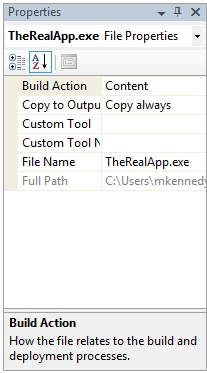
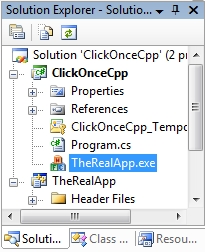
Add the C++ app and its libraries (if any) as existing items in the .NET app.
-
Change the build action to “Always Copy” as shown here:
-
Then you publish your .NET application and when it runs, TADA!, the C++ app is deployed, versioned, and kept up to date as well.
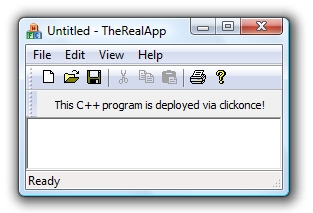
If you want to try it yourself, you can run this sample application here:
Run Michael’s Useless C++ App via ClickOnce… [defunct link: http://michael-kennedy.s3.amazonaws.com/blog/more-downloads/ClickOnceCpp/ClickOnceCpp.application]
You can also download the source [defunct link: http://michael-kennedy.s3.amazonaws.com/blog/more-downloads/clickoncecppsource.zip].