

tl;dr; chameleon-rs is my Rust implementation of Chameleon for Python web apps. It runs existing templates unchanged, with faster rendering, async support, and support for free-threaded Python.
The Chameleon HTML (template) language is one of my favorites. It was the default in Pyramid when I used to use that framework for my projects. I’ve since created fastapi-chameleon and chameleon-flask to allow you to easily use Chameleon on these more modern web frameworks.
Why modernize Chameleon for free-threaded Python?
But the world has changed. With official support for free-threaded Python in Python 3.14 and continued evolution in 3.15, we need to start expecting more from our web apps. Is the Chameleon package updated for multi-threaded Python? Not at all. In fact, the repository shows support only up to Python 3.13 and a failing build. It’s not keeping up with the times.
And there are many more features that belong in modern templating languages for Python apps. Partial template support for excellent libraries like HTMX. Faster performance. Markdown support. And much more.
I wanted more performance, parallelism, and modern features from all the major templating languages like Chameleon, Jinja2, or Django templates. Amazingly, they have all failed to deliver. That changes today (at least for Chameleon, for now).
What is chameleon-rs?
I reimplemented the Chameleon template language almost 100% in Rust. The core goals were compatibility, performance, modernization, and thread safety.
Existing templates and code run unchanged, with byte-identical output, several times faster. It also adds what a modern Python web app expects:
- Async rendering: keeps the event loop free while awaiting data.
- Built-in framework integrations: Flask/Quart, FastAPI, Starlette, Robyn, and Litestar.
- Template features: partials and Markdown.
- Free-threaded Python support: thread-safe rendering without the GIL.
No runtime dependencies.
How much faster is chameleon-rs?
Measured result: In my web app, switching to chameleon-rs cut median response times by roughly 20% across the site.
chameleon-rs compiles a template to a native program and runs it in Rust. The template’s own work (the loops, conditions, escaping, macro and slot calls, partials and output assembly) happens without Python bytecode. Python only runs where the template calls into your code: an attribute lookup, a method call, a helper.
You can see our synthetic benchmarks on the performance page of the docs. But the graph below is much more convincing. It shows the median response time when running on traditional Chameleon (the package) or chameleon-rs.
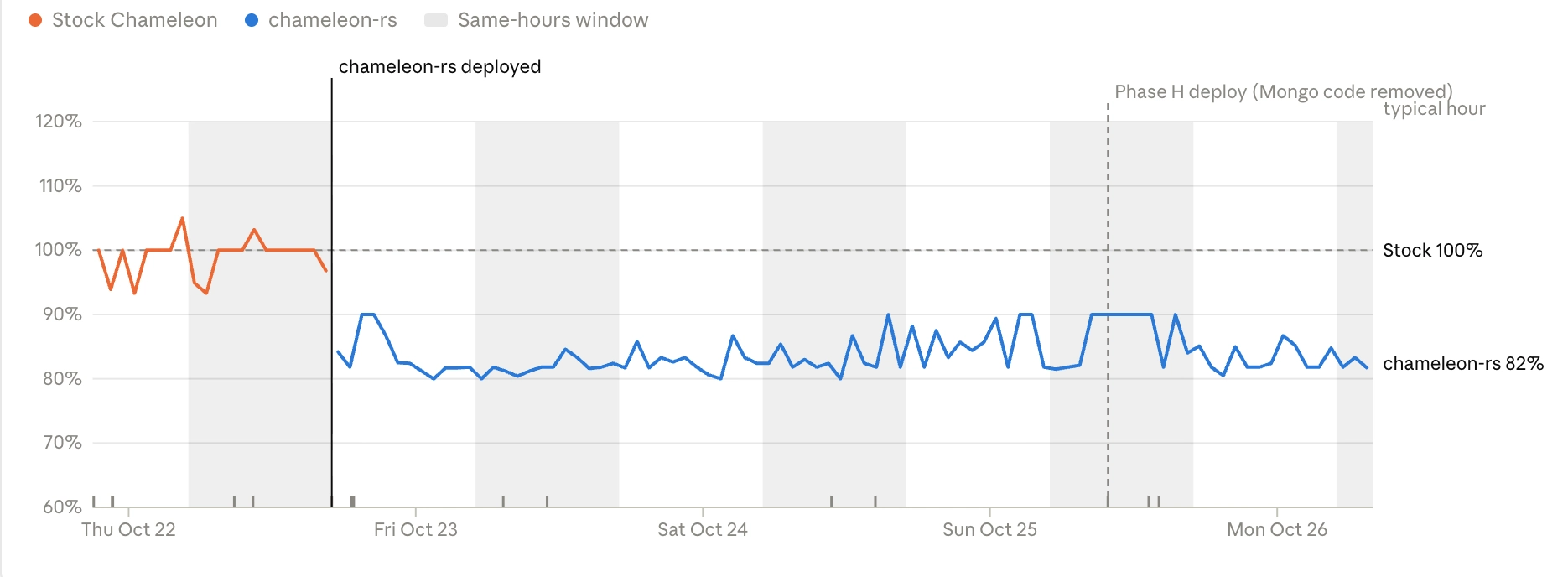
This is not “templates render 20% faster”. This is the entire web app, with user authentication, significant database work, logging, ecommerce, etc., seeing roughly 20% lower response times by using chameleon-rs!
How do I switch from Chameleon to chameleon-rs?
chameleon-rs runs code written for Chameleon unchanged. There are two ways to switch: install the compatibility alias and change nothing else, or change your imports.
One line: compat.install()
Add this at the very top of your app’s entry point (the module your server imports, or __main__), before anything imports Chameleon:
import chameleon_rs.compat
chameleon_rs.compat.install()
Or adopt more of the API and change the imports. Every public name is available from chameleon_rs directly:
# Before
from chameleon import PageTemplate, PageTemplateFile, PageTemplateLoader
import chameleon_partials
import chameleon_flask

# After
from chameleon_rs import PageTemplate, PageTemplateFile, PageTemplateLoader
import chameleon_rs.partials as chameleon_partials
import chameleon_rs.flask as chameleon_flask
What modern features does chameleon-rs add?
Performance itself is a feature. Compatibility is a feature. But why stop there? I added partials support, Markdown support, and asyncio support directly inside the template, as well as automatic event loop support for any async def view function. That’s the modernization part. And it was achieved by making chameleon-rs a superset of what Chameleon offered before, not by changing it.
Built-in template partials
A partial is a template file rendered inside another template, with its own small model. Use them for anything you repeat: a card in a listing, a form field, a table row, a fragment you also return on its own to HTMX (see HTMX).
chameleon-rs has partials built in. Every template can call render_partial, with nothing to register or pass in:
<div tal:repeat="video videos">
  ${render_partial('shared/partials/video_card.pt', video=video, show_date=True)}
</div>
Markdown inside Chameleon templates
chameleon-rs can convert Markdown to HTML while it renders, with a markdown: expression:
<article>${markdown: episode.notes}</article>
<div tal:content="markdown: comment.text"></div>
It’s opt-in: Chameleon has nothing like it, so you turn it on with configure() and use it in new templates. The converter is built into chameleon-rs (comrak, in Rust), so there’s no Markdown package to install. And because it entirely happens in Rust, it’s roughly 26x faster than mistune with the same extensions.
Turning it on
import chameleon_rs
from chameleon_rs import PageTemplate

chameleon_rs.configure(markdown=True)

page = PageTemplate('<article>${markdown: notes}</article>')
print(page(notes='# Show notes\n\nWe talked about **templates** and `Rust`.'))
Async rendering with render_async()
Chameleon renders synchronously. In an async web app (FastAPI, Starlette, Quart, Litestar, Robyn) that means a render runs on the event loop, and nothing else in that worker runs until it finishes. chameleon-rs keeps render() exactly as it was and adds render_async(), which renders on the event loop without holding it while it waits for data.
The framework integrations use it for you: an async def view decorated with @template renders with render_async. See the async rendering guide for the details and opt-in extras.
Thread safety for free-threaded Python
chameleon-rs has been tested extensively to be thread-safe. I have repeatedly profiled and optimized it to share as little data and take as few locks as possible. So when you’re ready to move to a truly multi-threaded (no GIL) web framework, your template library won’t hold you back.
How can I test chameleon-rs before switching?
If this sounds interesting, you can use shadow mode to try it out. Shadow mode renders a sample of real traffic with both engines (existing Chameleon and chameleon-rs) and reports any difference, while Chameleon keeps serving. Your users won’t see a difference, and you can check that the sampled requests get exactly the same output.