
TL;DR: Add this Zsh script to your .zshrc to automatically activate/deactivate venv or .venv as you navigate directories. It includes a whitelist feature for security.
Using a virtual environment is a well-known and important best practice for working on Python projects that use third-party dependencies, i.e. pretty much every Python project out there.
But it’s a hassle to make sure you always have the right one activated, that you have one activated, and checking if there’s even one present. Maybe you haven’t created one for this project yet, yet where you’ve checked it out from source control.
This post shares a simple shell script that will automatically find and activate your Python virtual environment. (* See security warning at the end.)
As you navigate through your source code, it seeks out virtual enviornemnts (named venv or .venv) and turns them on and off as in enter/leave that tree of your file system.
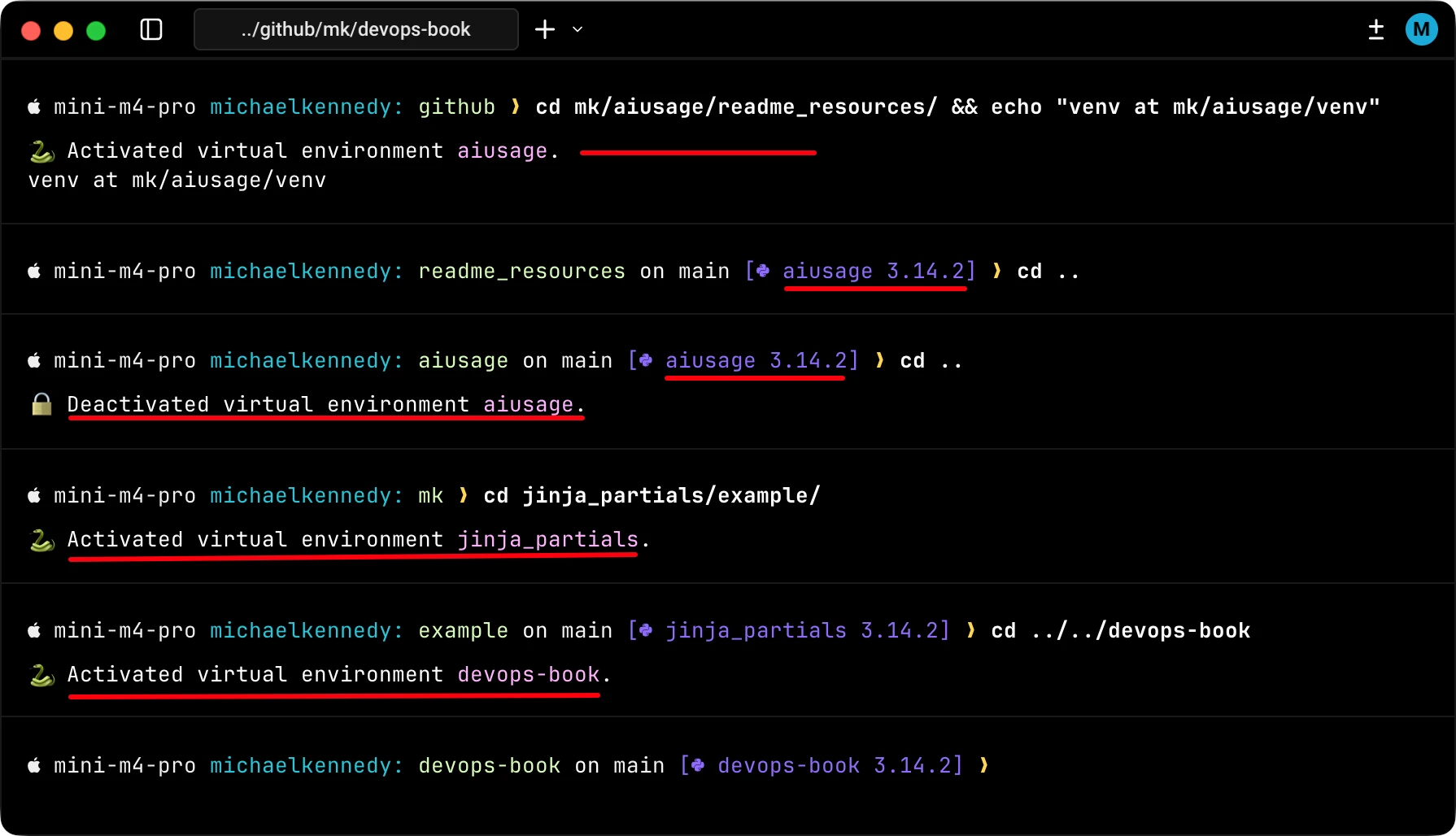
Why not just direnv?
Because direnv + Python seems to be a mess and it’s a sledgehammer when all you need is a thumbtack. Check out the still open issue Activate python venv by default? #1264 in the direnv project to get a sense.

Installing the script
Just save the script below to venv-auto-activate.sh and then add include it in your .zshrc file with source "venv-auto-activate.sh". Note that this only works on ZSH (not Bash) due to the use of the chpwd hook. Luckily ZSH is the default shell on macOS. If you use another shell, maybe this post will inspire you to create something similar.
Here’s the shell script:
# Virtual Environment Auto-Activation
# ===================================
# Automatically activates/deactivates Python virtual environments
# when changing directories

# Please read "A small security warning" on the post before continuing.

# Auto-activate virtual environment for any project with a venv directory
function chpwd() {
    # Function to find venv directory in current path or parent directories
    # Prefers 'venv' over '.venv' if both exist
    local find_venv() {
        local dir="$PWD"
        while [[ "$dir" != "/" ]]; do
            if [[ -d "$dir/venv" && -f "$dir/venv/bin/activate" ]]; then
                echo "$dir/venv"
                return 0
            elif [[ -d "$dir/.venv" && -f "$dir/.venv/bin/activate" ]]; then
                echo "$dir/.venv"
                return 0
            fi
            dir="$(dirname "$dir")"
        done
        return 1
    }

    local venv_path
    venv_path=$(find_venv)

    if [[ -n "$venv_path" ]]; then
        # Normalize paths for comparison (handles symlinks and path differences)
        # Use zsh :A modifier to resolve paths without triggering chpwd recursively
        local normalized_venv_path="${venv_path:A}"
        local normalized_current_venv=""
        if [[ -n "${VIRTUAL_ENV:-}" ]]; then
            normalized_current_venv="${VIRTUAL_ENV:A}"
        fi

        # We found a venv, check if it's already active
        if [[ "$normalized_current_venv" != "$normalized_venv_path" ]]; then
            # Deactivate current venv if different
            if [[ -n "${VIRTUAL_ENV:-}" ]] && type deactivate >/dev/null 2>&1; then
                deactivate
            fi
            # Activate the found venv
            source "$venv_path/bin/activate"
            local project_name=$(basename "$(dirname "$venv_path")")
            echo "🐍 Activated virtual environment \033[95m$project_name\033[0m."
        fi
    else
        # No venv found, deactivate if we have one active
        if [[ -n "${VIRTUAL_ENV:-}" ]] && type deactivate >/dev/null 2>&1; then
            local project_name=$(basename "$(dirname "${VIRTUAL_ENV}")")
            deactivate
            echo "🔒 Deactivated virtual environment \033[95m$project_name\033[0m."
        elif [[ -n "${VIRTUAL_ENV:-}" ]]; then
            # VIRTUAL_ENV is set but deactivate function is not available
            # This can happen when opening a new shell with VIRTUAL_ENV from previous session
            unset VIRTUAL_ENV
        fi
    fi
}

# Run the chpwd function when the shell starts
chpwd
A small security warning
While the script does not do anything shady, it does run code on your behalf. Normally, you’re using the terminal to go in and out of your projects with your virtual environments. In theory, someone could trick you into checking out or opening a directory structure that has a script named venv/bin/activate which runs via this script when you navigate into that tree structure.
If you interact with a lot of projects that you do not control or trust, maybe you want to have this feature as something you can turn on and off with a shell command command. Maybe update the script to give you a confirmation: Are you sure you want to activate SCRIPT_PATH? Something like that. As usual, it’s your call. Use at your own risk.
A security fix
After posting this article, a reader sent in a great idea:
What I did for the security concern was implement a whitelist. If it finds a venv but it’s not in the whitelist it informs me. Then I have a whitelist-venv command that will add that repo to the whitelist. – Scott H.
Amazing idea Scott. I think it balances safety with easy-of-use. I updated the script with a partner Python utlity to validate and manage this whitelist. Check it out at this Github Gist: